GCash ATM Withdrawal at Suvarnabhumi Airport — Complete Guide for Filipino Travelers
How to Withdraw Cash at Suvarnabhumi Airport Using GCash (Filipino Traveler’s Guide)
Step-by-step guide with real transaction data — KBank ATM vs. Airport Money Changer
Wondering how to withdraw cash in Suvarnabhumi Airport using your GCash card? This guide walks you through every step. The easiest option is the KBank ATM — the green machine — located at the Arrivals Hall, Level 2. KBank charges a ฿250 foreign card fee per withdrawal. Based on my actual transaction on August 29, 2025, withdrawing ฿18,000 baht cost me ₱32,255.78 from my GCash — a rate of approximately ₱1.792 per baht including the fee. This guide covers everything you need to know about how to withdraw cash in Suvarnabhumi Airport using your GCash Mastercard — where to find the ATM, how to use it, what fees to expect, and whether the ATM or airport money changer gives Filipino travelers a better deal.
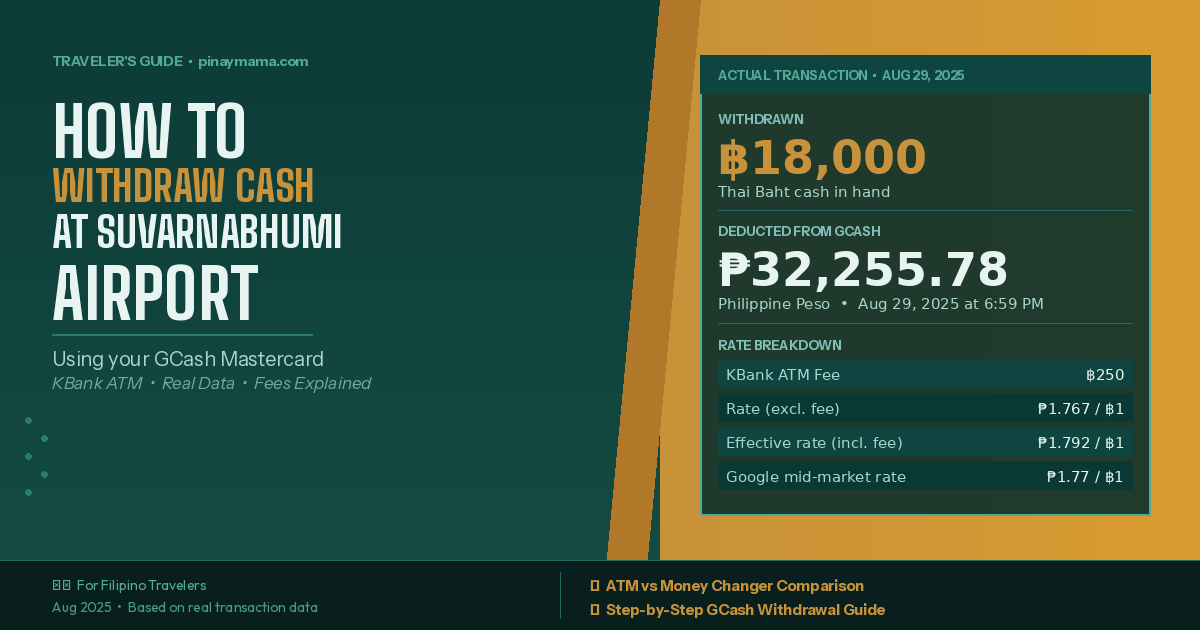
Use the green KBank ATM at Arrivals Level 2 (near the Klook SIM booth). Insert your GCash Mastercard → enter your PIN → press “Press Here” → select English → choose Withdrawal → enter amount in Thai Baht → accept the ฿250 fee → collect your receipt, baht, and card. Max withdrawal is ฿30,000 per transaction.
📱 Before You Leave the Philippines
Getting your GCash card ready before your flight saves a lot of stress. Knowing how to withdraw cash in Suvarnabhumi Airport starts before you even board the plane — here is what to prepare:
Step 1: Prepare Your GCash Card
- Know your PIN: Your GCash card PIN is required at foreign ATMs. Make sure you have it memorized before your trip. Forgot it? No stress — just open your GCash app, go to Profile > Cards, select your card, and tap Reset Card PIN. You’ll set a new 6-digit PIN and confirm it via SMS. Just remember this is different from your GCash app MPIN.
- Load enough balance: It is harder to top up your GCash once you are abroad. Load what you need plus a small buffer before your flight.
- Check your daily withdrawal limit: GCash has a default ATM withdrawal limit. Check and adjust this in the app if needed before traveling.
Based on my experience, GCash does not charge its own additional foreign transaction fee when using the GCash Card for international ATM withdrawals. The only fee deducted was the ฿250 KBank ATM fee — nothing extra on the GCash side. Note that this is based on using KBank specifically. I cannot confirm whether other banks in Thailand charge additional fees on top.
🏦 How to Withdraw Cash in Suvarnabhumi Airport — Step by Step
Step 2: Find the KBank ATM at Suvarnabhumi Airport
After you clear immigration and collect your baggage, head to the Arrivals Hall on Level 2. Look for the green ATM machines — those belong to KBank (Kasikorn Bank), one of Thailand’s largest banks. There are multiple KBank ATMs around the airport, so they are easy to spot.
The KBank ATM is located right next to the Klook SIM card booth at the Arrivals area. If you need a local Thai SIM card, you can pick that up and withdraw cash at the same stop — two tasks done at once.
Step 3: Withdraw Cash — Exact Steps at the ATM
Here is exactly what to do at the KBank ATM:
Insert your card into the card slot at the front of the KBank ATM.
Key in your GCash card PIN using the ATM keypad, then confirm.
The ATM will show a prompt — tap or press the “Press Here” button on the screen to continue.
Select English from the language options so you can navigate the rest of the steps easily.
Choose Withdrawal from the transaction menu, then select Savings as your account type.
Type in the amount you want to withdraw. I withdrew ฿18,000. The maximum is ฿30,000 per transaction. Always enter the amount in Thai Baht — never choose to be charged in Philippine Peso (see the important warning below).
The ATM will show a screen informing you of the ฿250 foreign card fee. Accept this charge to continue. This is KBank’s fee for foreign cards and is charged on top of your withdrawal amount.
Once confirmed, the ATM will dispense your cash. Make sure to take all three — your receipt, your Thai Baht, and your GCash card — before walking away from the machine.
When the ATM asks “Would you like to be charged in Philippine Peso (PHP) or Thai Baht (THB)?” — always choose Thai Baht, or look for the option that says “Without Conversion.” This tells the ATM to let the Visa or Mastercard network handle the conversion instead, which gives you a significantly better rate. Choosing PHP activates Dynamic Currency Conversion (DCC), where the ATM applies its own markup that can be 5% or higher — meaning you lose more money for the exact same amount of cash. When in doubt, always go with Thai Baht or “Without Conversion.” You will never regret it.
📊 My Actual Transaction Numbers — How to Withdraw Cash in Suvarnabhumi Airport (August 29, 2025)
Here is the exact breakdown from my GCash withdrawal at the KBank ATM at Suvarnabhumi Airport:
| Transaction Detail | Amount |
|---|---|
| Cash withdrawn | ฿18,000 Thai Baht |
| KBank foreign card fee | ฿250 Thai Baht |
| Total baht deducted from account | ฿18,250 Thai Baht |
| GCash deducted (Philippine Peso) | ₱32,255.78 |
| Exchange rate (excluding fee) | ₱1.767 per ฿1 |
| Effective rate (including ฿250 fee) | ₱1.792 per ฿1 |
| Google mid-market rate that day | ₱1.77 per ฿1 (Aug 29, 2025) |
In the GCash app, the transaction appeared as: “ATM Withdrawal from [SUVARNABHUMI AIR (1701)#1]” — ₱32,255.78 deducted on August 29, 2025 at 6:59 PM.
The effective GCash rate of ₱1.792 per baht was very close to the Google mid-market rate of ₱1.77 that day. The ฿250 fee added only about ₱0.025 to the effective per-baht rate — a small premium for the convenience of withdrawing directly at the airport.
💱 ATM vs. Airport Money Changer — Which Is Better?
The airport money changer rate that day was ₱1 = ฿0.35, meaning you had to pay ₱2.857 for every baht. To get ฿20,000, the money changer charged ₱57,142.86.
| KBank ATM ✅ | Airport Money Changer ❌ | |
|---|---|---|
| Thai Baht received | ฿18,000 | ฿20,000 |
| Transaction fee | ฿250 | None |
| Total Philippine Peso paid | ₱32,255.78 | ₱57,142.86 |
| Effective rate per baht | ₱1.792 / ฿1 | ₱2.857 / ฿1 |
| Verdict | CHEAPER ✅ | 59% more expensive ❌ |
On August 29, 2025, the KBank ATM was significantly cheaper than the airport money changer — even after the ฿250 fee. The money changer rate was 59% worse. That said, rates change daily — always compare both when you arrive before deciding.
Quick Rule of Thumb for Filipino Travelers
- If the money changer offers ₱1 = ฿0.56 or better → money changer may be worth it
- If the money changer offers ₱1 = ฿0.55 or worse → use the ATM instead
- The airport money changer is almost always the worst option — rates outside the airport are typically better
📲 GCash-Specific Tips for Withdrawing Cash Abroad
- Withdraw in one bigger transaction. You pay ฿250 per withdrawal regardless of amount — withdraw more at once to save on fees.
- Verify in the app immediately. The merchant name will appear as “SUVARNABHUMI AIR.”
- Screenshot the GCash transaction. Keep a record in case of any disputes.
- Keep the ATM receipt. Cross-check the baht amount with your GCash deduction.
- Know your limits. GCash has daily and per-transaction ATM withdrawal limits — check these before your trip.
💰 How Much Thai Baht Should You Bring for Bangkok?
A practical budget guide for Filipino travelers visiting Bangkok for 3–5 days:
| Typical Expense | Estimated Cost (THB) |
|---|---|
| Food — street food, local restaurants, cafes | ฿500–800 per day |
| Transport — BTS Skytrain, MRT, tuk-tuk | ฿100–300 per day |
| Shopping — Chatuchak, malls, night markets | ฿1,000–3,000 total |
| Entrance fees and tourist attractions | ฿200–500 per day |
| Emergency / unexpected expenses | ฿1,000–2,000 total |
Recommended total for a 3–5 day trip: Around ฿8,000–฿15,000 depending on your budget and travel style.
✅ Complete GCash ATM Checklist for Suvarnabhumi Airport
Use this checklist every time you need to know how to withdraw cash in Suvarnabhumi Airport so you never miss a step.
Before Your Flight
- ✅ Confirm your GCash card PIN
- ✅ Load sufficient pesos into GCash
- ✅ Check and adjust your daily ATM withdrawal limit if needed
- ✅ Make sure your GCash Mastercard is not expired before your trip
At Suvarnabhumi Airport
- ✅ Find the green KBank ATM (near the Klook SIM card booth)
- ✅ Insert GCash Mastercard → enter your PIN
- ✅ Press “Press Here” → change language to English
- ✅ Select Withdrawal → Savings
- ✅ Enter amount in Thai Baht (max ฿30,000 per transaction)
- ✅ CHOOSE THAI BAHT — not Philippine Peso
- ✅ Accept the ฿250 transaction fee
- ✅ Collect your receipt, baht, and card
After Withdrawing
- ✅ Open GCash app and verify the deduction (look for “SUVARNABHUMI AIR”)
- ✅ Screenshot the transaction for your records
- ✅ Keep the ATM receipt
❓ Frequently Asked Questions
These are the most common questions Filipino travelers ask about how to withdraw cash in Suvarnabhumi Airport:
All rates and figures are based on an actual GCash withdrawal on August 29, 2025 at Suvarnabhumi Airport. Exchange rates fluctuate daily. Always verify current rates before deciding between ATM and money changer. GCash fees and ATM policies may change — check the GCash app before traveling.